
Download Fortres 101 – Free Windows Security Tool for System Protection & Malware Defense
Fortres 101 by Fortres Grand is a lightweight yet powerful security utility designed specifically for Windows users seeking reliable protection against unauthorized system modifications and malware threats. This free software operates silently in the background, ensuring your computer’s core settings remain untouched by malicious actors or accidental changes. Whether you're a home user, student, or professional managing sensitive data, Fortres 101 delivers peace of mind by locking down critical system components such as desktop configurations, network settings, and Windows 8/10/11 system preferences.
With a simple, intuitive interface, users can customize which areas of their system to protect—offering both broad and selective safeguarding options. The software requires a unique password for access, adding an essential layer of security even if the tool is discovered by others. By preventing unauthorized access and changes, Fortres 101 ensures your digital environment stays consistent and secure.
Its minimal resource usage and seamless integration make it ideal for older systems or users who prefer efficient, no-frills tools. Whether you're securing a shared computer or protecting your personal workspace, Fortres 101 stands out as a trustworthy, free solution for maintaining system integrity.
Advanced Protection Features of Fortres 101
- Protects desktop settings, including wallpaper, icons, and screen resolution
- Secures Windows 8/10/11 system configurations from unauthorized changes
- Locks network settings such as IP addresses, DNS, and proxy configurations
- Prevents modifications to registry entries and system policies
- Requires a custom password for access and configuration changes
- Runs in the background with minimal CPU and memory usage
- Offers selective protection—choose exactly what to secure
- Provides real-time monitoring and automatic protection activation
- Compatible with Windows 10 and Windows 11 (32-bit and 64-bit)
- Free to download and use with no hidden subscriptions or ads
One of the standout aspects of Fortres 101 is its granular control over system protection. Unlike many security tools that offer a one-size-fits-all approach, Fortres 101 empowers users to decide which system elements need safeguarding. For example, if you're using a public computer at a library or internet café, you can protect your desktop layout, network settings, and browser preferences so they don’t get altered by others.
Similarly, in a corporate environment, IT administrators can use Fortres 101 to lock down specific configurations across multiple machines without relying on complex group policies. The software’s real-time monitoring ensures that any attempt to modify protected settings triggers an immediate block, with no visible alerts to the user—maintaining discretion. This stealth mode is particularly useful for preventing malware from altering system behavior, such as changing your default browser or redirecting your DNS settings.
The password protection feature adds another layer of defense: even if someone gains access to your computer, they can’t disable or reconfigure Fortres 101 without knowing the password. This makes it a valuable tool for both personal and professional use. Additionally, the lightweight design means Fortres 101 won’t slow down your system, making it ideal for older PCs or users who prioritize performance over flashy features.
Easy Installation & Simple Usage for All Users
Getting started with Fortres 101 is straightforward and requires no technical expertise. The download process is quick and secure, with the software available from trusted sources. Once downloaded, simply run the installer, follow the on-screen prompts, and the setup completes in under a minute.
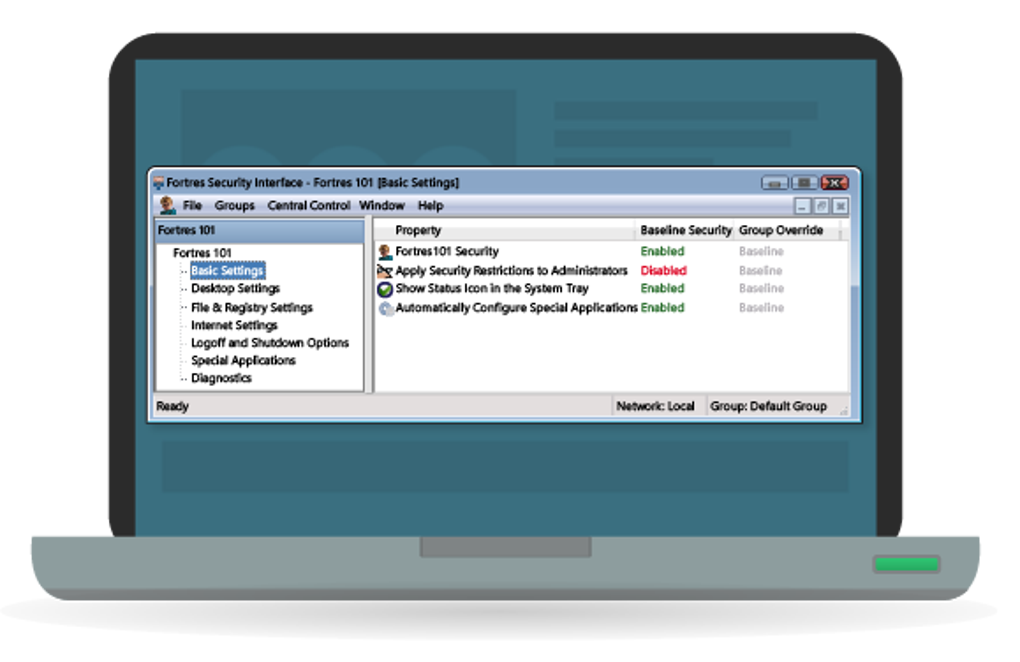
After installation, Fortres 101 launches automatically and runs in the system tray—minimizing clutter while remaining active. The main interface is clean and minimal, featuring a dashboard with toggle switches for each protected component. Users can easily select which settings to safeguard, such as desktop appearance, network configurations, or system policies.
Each toggle is accompanied by a brief description, helping users understand the impact of enabling protection. To ensure security, the software prompts you to set a unique password during the first run. This password is used to access the configuration panel and make changes—no password, no modifications.
Even if someone tries to tamper with the software, they’ll be blocked unless they know the password. The simplicity of the tool extends to its update mechanism: Fortres 101 checks for updates automatically, ensuring you always have the latest version with improved security patches. No manual intervention is required, making it perfect for users who want a “set and forget” security solution.
Whether you're a beginner or an advanced user, the intuitive design ensures a smooth experience. There are no complex settings to navigate, and the tool doesn’t bombard you with notifications. Instead, it works silently in the background, protecting your system without interrupting your workflow.
This makes Fortres 101 an excellent choice for families, students, or anyone looking for a reliable, hassle-free way to maintain system integrity.
Compatibility & System Requirements
Fortres 101 is specifically designed for Windows operating systems and supports all major versions from Windows 7 through Windows 11, including both 32-bit and 64-bit architectures. This wide compatibility ensures that users with older machines or legacy systems can still benefit from its protection. The software is lightweight, requiring only a minimal amount of RAM and CPU resources—typically less than 10 MB of memory and negligible processing power.
This makes it suitable for low-end PCs, netbooks, and even older laptops that may struggle with heavier antivirus suites. Fortres 101 does not require administrative privileges to run, but it does need them to configure protected settings—so users should run the installer with elevated rights the first time. Once configured, the tool runs as a background service, ensuring continuous protection without user input.
It’s important to note that Fortres 101 is not a full antivirus or anti-malware solution; instead, it complements existing security software by protecting system settings from being altered. For best results, pair it with a reputable antivirus like Malwarebytes or Windows Defender. The software is entirely free to download and use, with no trial periods, ads, or data collection.
It does not install unnecessary bloatware or toolbars, ensuring a clean and secure installation. If you're using a Mac or Linux system, Fortres 101 won’t work—but for Windows users, it’s a reliable, secure tool that enhances digital safety without complexity. Regular updates are released to address compatibility issues and improve performance, so users can always rely on the latest version.
With its focus on system integrity and ease of use, Fortres 101 stands out as a must-have utility for any Windows user.
Pros & Cons: Is Fortres 101 Right for You?
Pros
- Free to download and use with no hidden costs
- Lightweight and efficient—minimal impact on system performance
- Protects critical system settings from unauthorized changes
- Simple, intuitive interface suitable for beginners
- Customizable protection—select only what you want to secure
- Requires a password for configuration, enhancing security
- Runs silently in the background without interruptions
- Regular updates ensure ongoing compatibility and security
Cons
- Not a full antivirus—should be used alongside other security tools
- Limited to Windows OS (no Mac or Linux support)
- No mobile version for Android or iOS
- Basic interface lacks advanced customization options
- Only protects system settings, not files or folders
Frequently Asked Questions (FAQ)
Is Fortres 101 free to download and use?
Yes, Fortres 101 is completely free to download and use. There are no trial periods, subscriptions, or hidden fees. The software is available at no cost for personal and professional use.
Can I use Fortres 101 on Windows 11?
Yes, Fortres 101 is fully compatible with Windows 11, as well as Windows 10, 8, and 7. It supports both 32-bit and 64-bit versions of these operating systems.
Does Fortres 101 slow down my computer?
No, Fortres 101 is designed to be lightweight and efficient. It uses minimal system resources, consuming less than 10 MB of RAM and almost no CPU power, so it won’t slow down your computer.
Can I protect specific system settings only?
Yes, Fortres 101 allows you to choose which system components to protect. You can enable protection for desktop settings, network configurations, registry entries, and more—without securing everything.
What happens if someone tries to change my protected settings?
Any unauthorized attempt to modify protected settings will be blocked automatically. The software prevents changes without your password, ensuring your system stays secure and unchanged.
Final Verdict: Why You Should Download Fortres 101 Today
Fortres 101 is a powerful, free tool that fills a crucial gap in everyday computer security. While it doesn’t replace antivirus software, it complements it by protecting your system’s core settings from tampering—something many users overlook. Its ease of use, lightweight design, and robust password protection make it ideal for anyone who wants to maintain system integrity without complexity.
Whether you're using a shared computer, managing a small business network, or simply want to prevent accidental changes, Fortres 101 delivers reliable, silent protection. It’s a must-have utility for Windows users seeking a secure, hassle-free way to safeguard their digital environment. Download Fortres 101 today and take control of your system’s security with confidence.
Download Fortres 101 now—secure your Windows PC with a free, trusted protection tool.







